Sunday, June 14, 2015

Android games catching up to iOS games


Global consumer spending rose 50 per cent on Android in the first calendar quarter, comfortably outpacing the 30 per cent growth on iOS.
The gap in total spending may still be very much in favour of iOS, but Android has made up significant ground since Q1 2014. Android's share of the hardware market also grew by 4 per cent in the last year, finishing Q1 2015 with nearly 75 per cent of the global installed base.
1
And multiplayer games are a driving force behind that increase in spending, with 6 of the top 10 games in Q1 2015 allowing group or team play. Among the top 50 games in the quarter, 60 per cent of all consumer spending was generated by multiplayer titles, even though they only accounted for 30 per cent of downloads. In both cases, that majority share has increased significantly since Q1 last year.
App Annie also nodded to Steam as proof of the benefits of multiplayer games, not just in terms of revenue, but in their stickiness and the levels of user engagement they inspire. In May 2015, 88 per cent of the peak concurrent daily users for Steam's top 50 games went to multiplayer titles.
2
The Apple Design Award-winning Vainglory is an example of these trends playing out in mobile. Super Evil Megacorp's target audience was core gamers like those playing League of Legends and Dota 2 on Steam, who haven't yet embraced mobile hardware as a primary gaming platform.
Speaking to GamesIndustry.biz last year, CEO Bob Daly said that the imminent transition of core gamers from PC and console to mobile and tablet will be, "the next big sea-change in terms of the industry," and, "potentially larger than anything that we've seen in games in a while."
"Right now they see consoles and PCs as their primary gaming platforms and they're also playing on mobile and tablet," added COO Kristian Segerstrale. "Increasingly tablets are outselling PCs, and people are shifting from PCs to tablets, there is an incredible opportunity to create games that ultimately will convince core gamers that these are worthwhile primary gaming platforms."

Friday, June 12, 2015

Linux Mint 17.1 review

The Linux Mint team recently released Linux Mint 17.1—a somewhat minor but still welcome upgrade to the Ubuntu-based ecosystem. And while Linux Mint 17.1 arrives as it usually does (a few weeks after the release of a new version of Ubuntu), version 17.1 is not based on Ubuntu's latest effort, 14.10. Instead, this edition of Mint remains tied to the last Long Term Support (LTS) release, Ubuntu 14.04.

This marks the first time Linux Mint has not used the newest version of Ubuntu for a release. But if you paid attention to the curious approach of Linux Mint 17.0, you'll know that was the plan all along. These days, Mint will not be changing its Ubuntu base again until the next LTS release—Ubuntu 16.04—arrives in 2016. And at first glance, it might seem like a bad thing. After all, Mint is missing out on whatever new stuff is in Ubuntu 14.10 (in this case it's not much, but 15.04 will have plenty of changes). However, Mint 17.1 is in fact a very good sign for fans of the distro's own tools, like its homegrown Cinnamon desktop. By relying on a consistent LTS release, Mint developers can more or less ignore the base system. Instead of spending all their time and effort making sure whatever Ubuntu has changed works with Mint, they can focus on what makes the ecosystem great—namely, its two primary desktops, MATE and Cinnamon.

Linux Mint 17.1—a new leaf

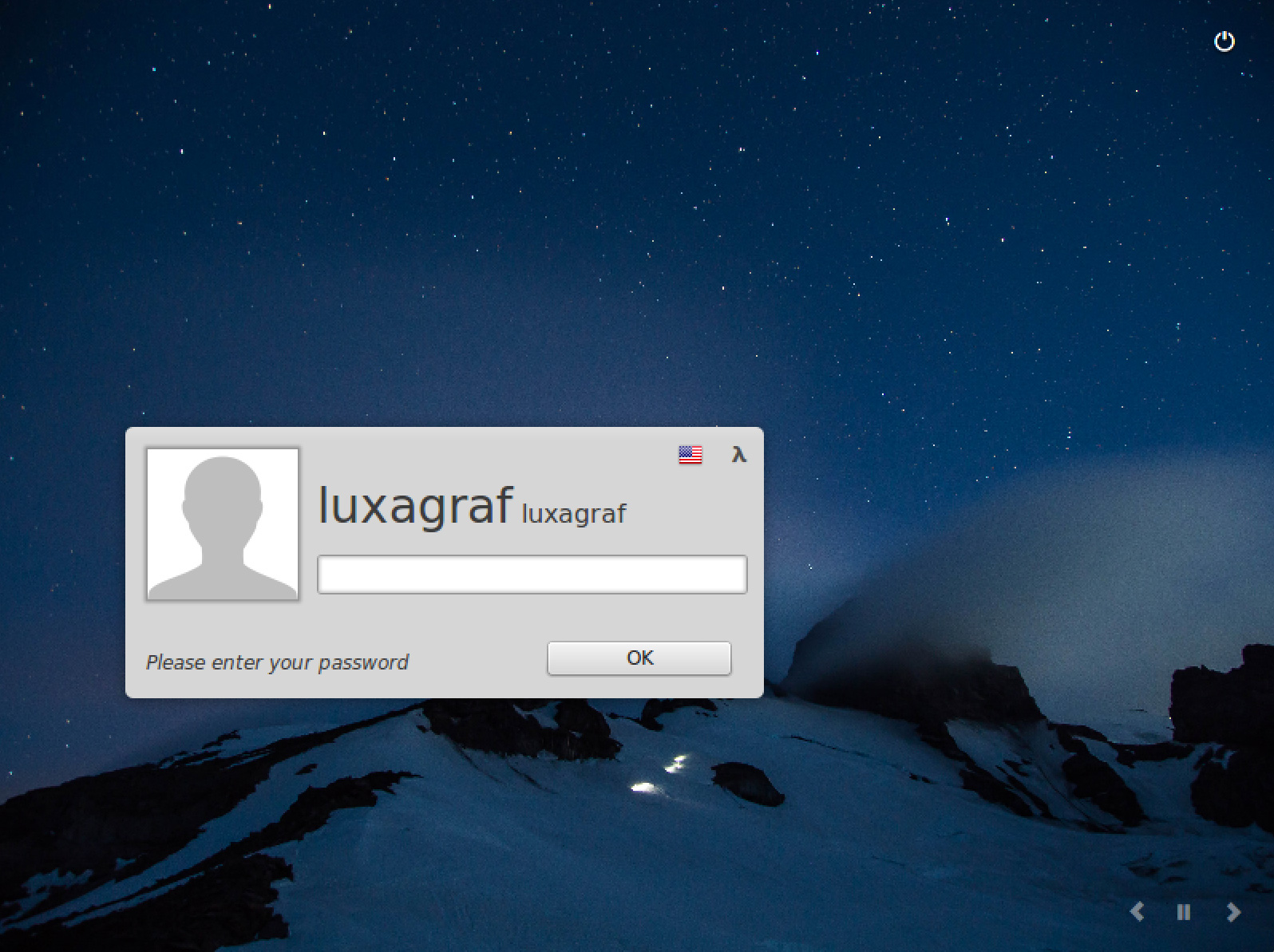
While most of what's new in Mint 17.1 will be seen in the updated desktops, there are some common components to both Cinnamon and MATE. While accessing some of these new tools varies slightly by desktop, the results are the same in both. Right away, you'll notice the login screen is among these new and improved elements.
If you start the Mint installation process and walk away, you'll likely come back to an image slideshow that's slowly flipping through all the various wallpapers that Mint 17.1 offers. The choices are vast, since Mint 17.1 contains not only wallpapers that are new with this release but all the options that came with every previous Mint release. Suffice it to say that if you need an aesthetic desktop refresh, Mint 17.1 has you covered.

Enlarge / The new Mint 17.1 login screen, complete with slideshow controls.
The slideshow is a nice touch, and you can control how it behaves with the Login Window Preferences menu. This menu now has Theme, Auto Login, and Options items to access different settings. There's also a theme preview button to test out other available choices (or any options you install yourself).
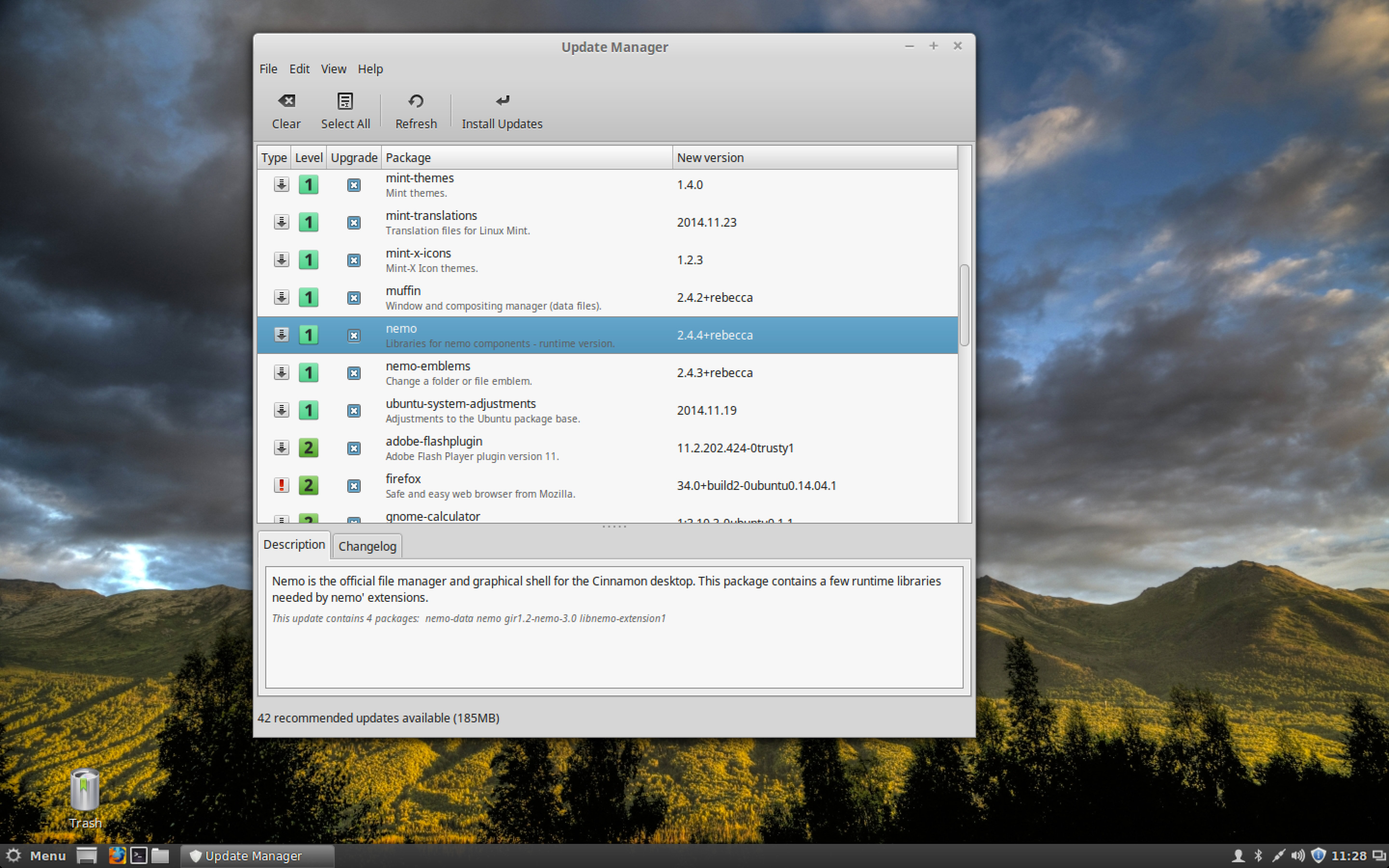
While the newly polished login screen is nice, a far more useful change comes in the form of a revamped Update Manager. Mint has been refining this for some time now. The last release saw the introduction of some new icons and a numbered rating system that lets you know which updates are essential and which can be safely ignored. Mint 17.1 builds on those improvements with a new feature that groups package updates together based on source package.
That is, rather than just list every new package that's going to be updated, Mint 17.1 will group everything you need to update in a single package—say, LibreOffice—into one line in the Update Manager. Select the update and you can see the individual packages listed in the bottom pane. If you want more information on what's new, there's a Changelog tab that will download details on what's new in that package.

Enlarge / Mint 17.1's Update Manager.
The new grouping system will help users avoid selectively updating packages and potentially breaking the whole because not every necessary part is up to date. Mint's lead developer Clement Lefebvre described how it used to be on the distro's site: "When a developer fixes a bug or writes new features, the source code is modified and all packages which are related to it become available under a new version... it is therefore futile and sometimes dangerous to apply some package updates and not others within the same source package." But because Mint 17.1 groups updates, you'll never apply something incomplete. It's now considerably easier to review exactly what's being updated in each source package because everything is shown together in one place.
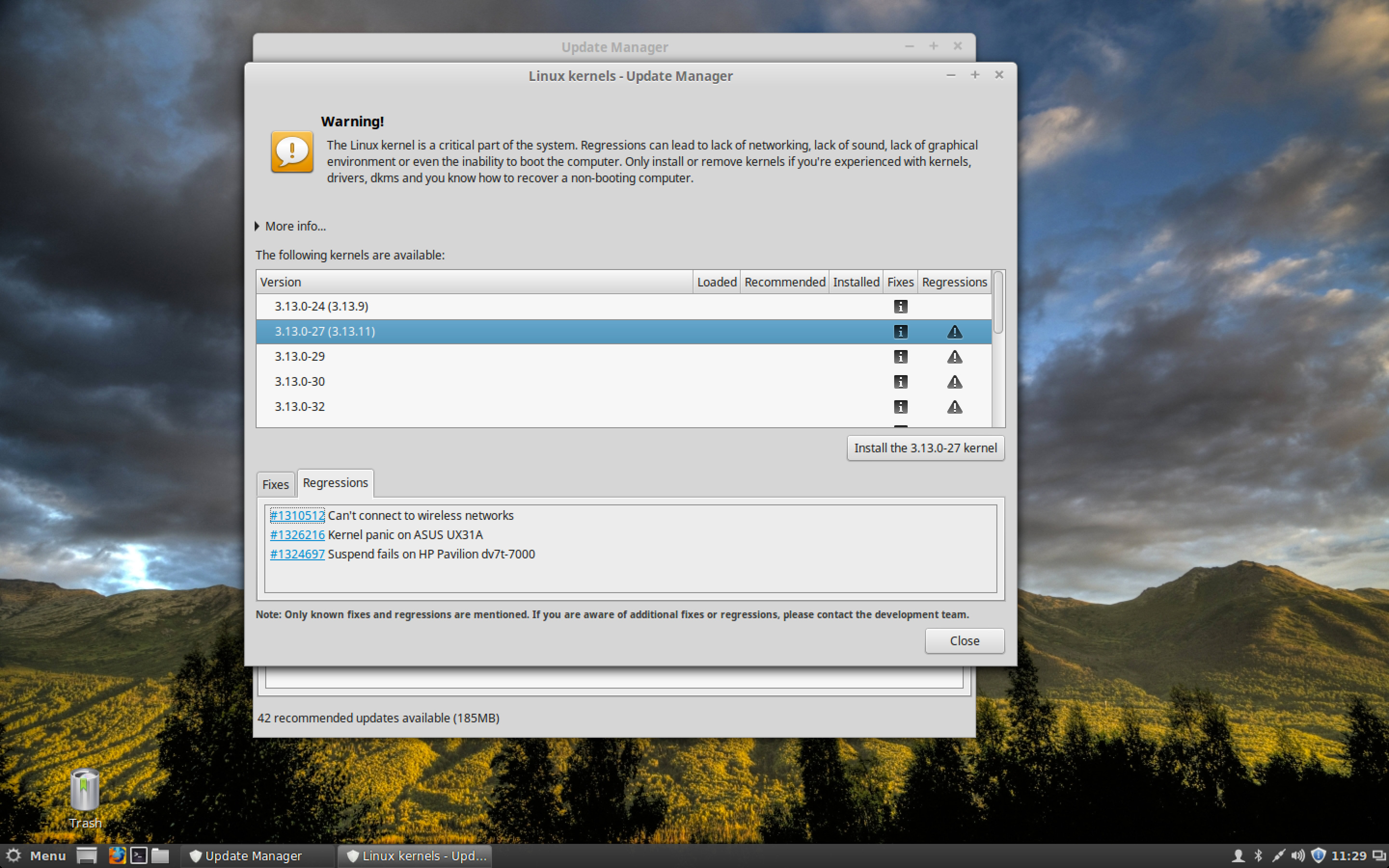
Among other notable tweaks, the Update Manager in Linux Mint 17.1 features a redesigned kernels menu that makes it easier to see security updates and any regressions in each kernel update. Linux Mint 17.1 also ships with a new font, Google's Noto font, which is Google's attempt to create a font family that supports all the world's languages. And while the trademark minty green is still the default, Mint's theme gets quite an overhaul in this release. Those that don't like the default green can banish it in favor of quite a few new colors, and there are a number of dark-on-light theme options available if the default light-on-dark interface isn't what you want.
As noted previously, this release sticks with the Ubuntu 14.04 base, meaning the kernel is v3.13. That's a little behind what most distros released in the last couple of months are using. If you're already running Mint 17 without issues, then you'll likely be fine with 3.13. The main issue you may run into is if you have any brand new hardware that requires a newer kernel for full support.
On the other hand, one bit of hardware that does get some love in this release is the single-button trackpad (like, for example, those used in Apple laptops). If you're planning to run Mint on a Macbook of some kind, this release is a must-have. Be sure to check out the new Mouse and Touchpad panel in the System Settings, which now allows you to configure which actions apply to two-finger and three-finger clicks (by default it's right and middle click, respectively).

Cinnamon is Mint's homegrown flagship desktop. If you're not interested in new approaches to the desktop like those being pioneered by Ubuntu's Unity or GNOME 3's Shell interface, Cinnamon offers a more traditional interface based on familiar ideas like a task bar and main menu. Cinnamon is not breaking any new ground on the UI front, but it's polished, fast, and reliable.
We've been using Cinnamon nearly full time for quite a few releases now. When it first arrived, it was the desktop you knew had potential, but it was buggy enough to create a bash alias to restart things after a crash. Thankfully those days are long gone, and Cinnamon has been rock solid in use ever since Mint 15.
For Mint 17.1, Cinnamon has been updated to version 2.4. This release focuses on reducing memory use and speeding things up. While Cinnamon will never be as lightweight as something like LXDE or Openbox, Cinnamon 2.4 is considerably snappier than its predecessor, even on underpowered hardware like my aging Asus EeePC 1005.
When you install the Cinnamon version of Mint 17.1, once you get past the slideshow login screen you'll be greeted with yet another new animation—a GNOME-inspired desktop zoom that gives the Cinnamon boot experience a more polished feel. It's a small thing, but it sets the tone quite nicely for Cinnamon 2.4. The Cinnamon interface remains light-on-dark by default, but as noted earlier, there are numerous new theme options and colors to customize things to your liking (most GTK 2 and 3 themes should work as well).
Among the more visual changes in this release are a slew of new features in Nemo, Cinnamon's file manager. The latest version of Nemo adds support for colored folders, new ways to customize the sidebar, and what Mint calls "emblems."

Enlarge / Adding color and emblems to the Documents folder.
The emblems are little sub-icons that are displayed on top of the base icon—for example, the musical note emblem overlays the Music folder by default. You can now apply any emblem to any folder or file. The emblems make it a little easier to find the folder or file you're looking for in the sidebar or list views (as do the new colored folder options). The emblems and colors would be even better if they showed up in open/save dialogs in other apps, but unfortunately they do not.
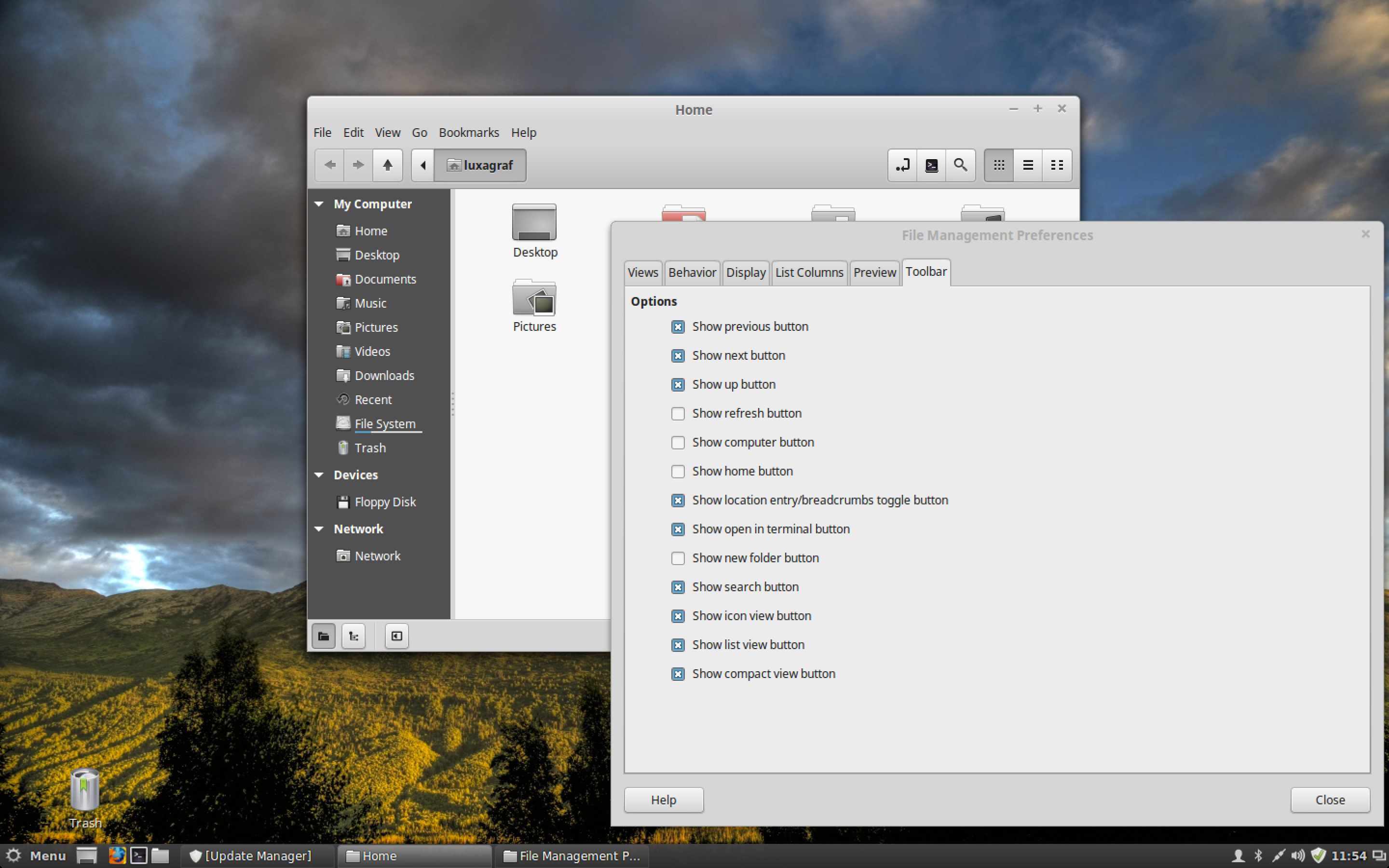
Nemo's toolbar has been redesigned, and its buttons are now configurable. For example, there's an especially handy button that will open a terminal window in the current directory. It's not there by default, but you can enable it under Edit > Preferences.

Enlarge / Customizing Nemo's toolbar.
The Cinnamon settings panel has been revamped for this release, with panes now displayed in alphabetical order within each section. There are also a couple of new panes, including one for controlling notifications. The Privacy pane is particularly of note, as it's based on the same tool in GNOME 3 and allows you to control how long recent items are stored.
Other improvements in Cinnamon 2.4 include support for multiple panel launchers, improvements in the sound applet, and the usual slew of bug fixes that come with any major update. Between the new features, themes, added polish, and speed improvements, Cinnamon 2.4 feels (to at least one Linux enthusiast) like simply the best desktop to use on any OS, including Windows and OS X.

Linux Mint 17.1 MATE desktop

The MATE desktop began life as a fork of GNOME 2, a response to GNOME 3's radical departure from GNOME 2. Since then, MATE has gone on to become very much its own thing
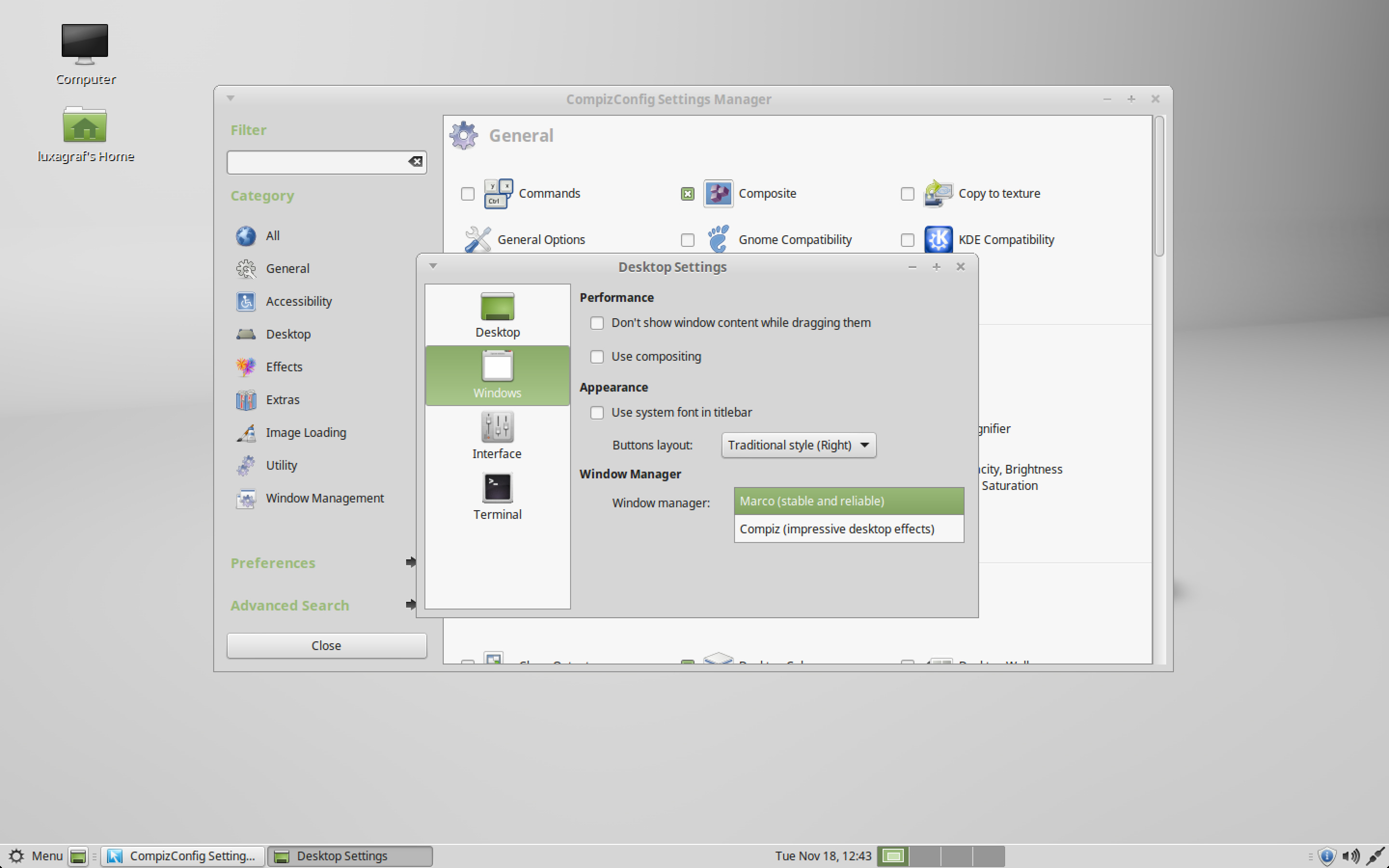
That's not to say that the latest, MATE 1.8, has strayed too far from its GNOME 2 roots. This release is still aimed at GNOME 2 fans and those looking for a lightweight but full-featured desktop. In fact, those GNOME roots are strengthened in this release with the addition of Compiz support. Yes, it's true, MATE and Compiz can be joined for a return to the halcyon days of rotating cubes and wobbly windows.

Enlarge / Compiz and MATE, together at last.
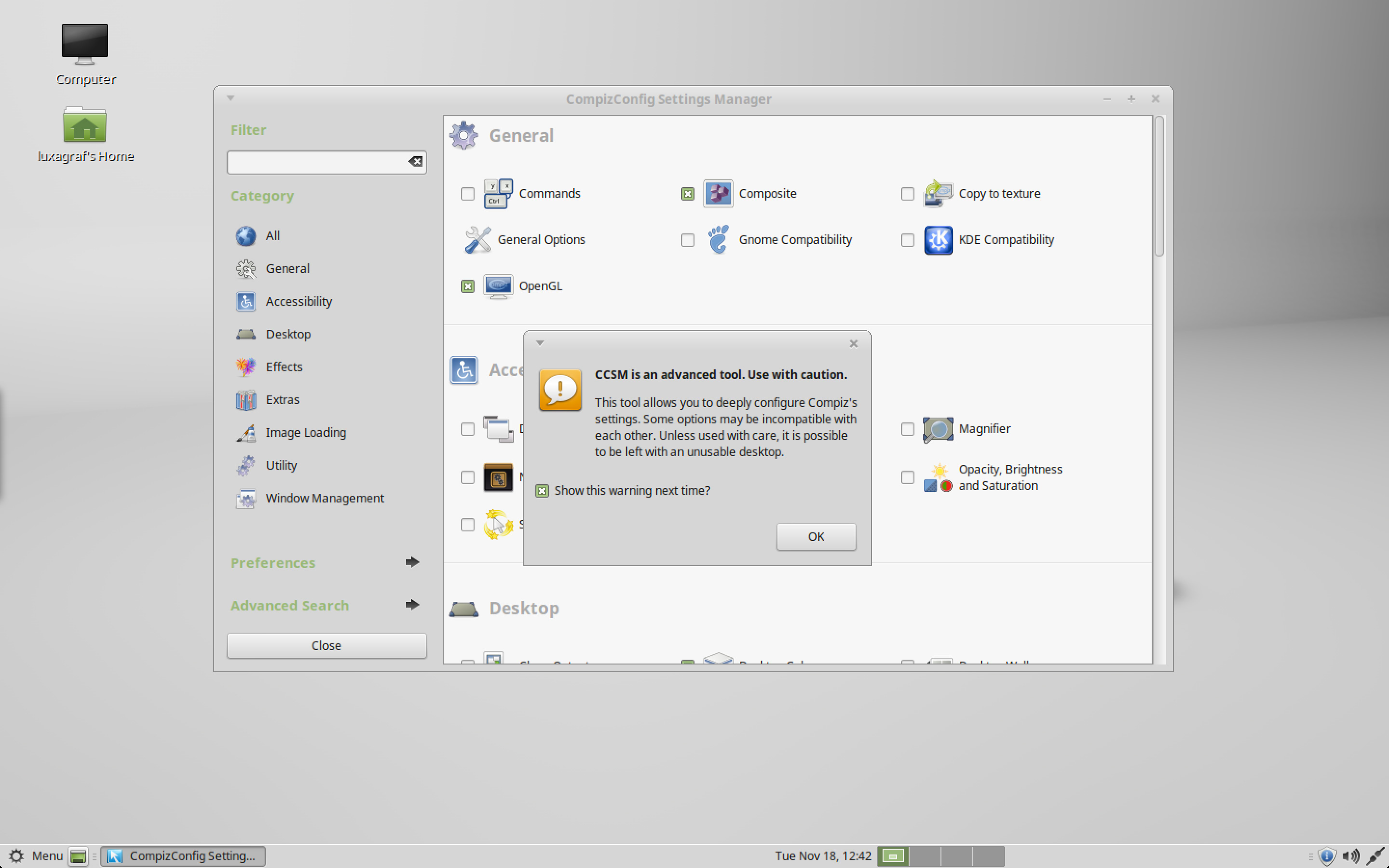
To keep MATE true to its lightweight past, Compiz is not enabled out of the box, but turning it on is just a matter of opening Desktop Settings > Windows and switching from the default Marco window manager to Compiz. MATE will warn you that Compiz's Settings Manager is a powerful tool capable of rendering your desktop unusable, but once you ignore that, you'll be able to tweak and break Compiz just like you did when Ubuntu 8.10 was the best thing in Linux.

Enlarge / Compiz and MATE... you've been warned.
That said, we would not recommend using Compiz with MATE. We found the Compiz support to be a bit buggy, and of course Compiz requires more powerful hardware, which negates part of the appeal of MATE. If you want more bang for your desktop buck, go with Cinnamon. That is, unless you really love rotating cubes and wobbly windows. In that case, perhaps you'll have better luck.
The Mint-X theme options mentioned earlier give you a few new ways to customize MATE, and the new font provides better support for some languages (CJK in particular). Under the hood, this iteration comes with some bug fixes and stability improvements as well.
If you pine for the days of GNOME 2, complete with Compiz wobbly windows and the rest of the desktop effects that once said "this is a Linux desktop," then MATE 2 fits the bill. If you prefer a lightweight desktop that just stays simple and out of the way, MATE is still a great choice... just stick with the default Marco window manager.

Mint 17.1 software stack

When Mint first announced its intention to stick with an Ubuntu 14.04 base for a few years, many users were concerned about what that would mean for application updates. As noted, the kernel is not as up to date as what you'll find in the latest version of Ubuntu, openSUSE, or the upcoming Fedora 21.
On the application front, though, things are looking much better. Mint continues to ship with just about everything you need for all-around desktop use, and it even includes some useful apps often left out of other distros by default (like GIMP and VLC). Note, however, that this does make the Mint DVD a little on the large size (1.4GB for the Cinnamon DVD).
Both the Cinnamon and MATE versions of Mint 17.1 ship with the latest stable versions of all its included apps: Firefox, LibreOffice, Banshee, VLC and other common applications. Apparently Mint can keep its base system and eat its application updates, too.

Small, but upgraded for a reason

Mint 17.1 is well worth the upgrade, though as Lefebvre writes in a post on how to upgrade from Mint 17, you should "upgrade for a reason."
"As excited as we are about 17.1, upgrading blindly for the sake of running the latest version does not make much sense, especially if you're already happy with 17 and everything is working perfectly," the post says.
That refreshing bit of pragmatism is worth keeping in mind regardless of which distro or desktop you use. But again, we had no trouble at all upgrading from Mint 17—everything is once again working perfectly. All you need to do is open Update Manager and head to the Edit menu, where you should see an option to "upgrade to Linux Mint 17.1 Rebecca."
The only problem we've encountered so far in use is the known bug involving problems with Skype on 64-bit versions of Mint 17.1. Fortunately, there's already an easy fix.
Linux Mint 17.1 will receive security updates until 2019, and until 2016, all Mint releases will continue to use the same base package system, AKA Ubuntu 14.04. So far, abandoning the newest base for an LTS option looks promising. Moving from 17 to 17.1 has proved painless, which means that upgrading to 17.2 and beyond should be more of the (delightful) same.

Saturday, June 06, 2015

Videogames are bigger than Hollywood

The majority of video games in the U.S. are purchased and played by adults. The largest titles make money that Hollywood films could only dream of raking in, and the biggest players in the industry run multibillion-dollar multinational operations that employ thousands of people. Yet many consumers still think of gaming as a kid’s thing that doesn’t merit serious consideration or scrutiny. In an age where our culture recognizes previously sniffed-about industries like professional sports as much more than child’s play, it’s time to get over that same hump about video games.

Games, like film, TV, and literature before them, are commercialized art and products of our culture. They can be great or terrible, memorable or forgettable, and everything in between. They can be five minutes of dreck you play on your phone on the bus, or 500 hours of life-changing tramping around a richly imagined virtual world.

In 2013 alone they were also a $21 billion business in the U.S. And still, in the rare instance that the nightly news even mentions video games, it’s likely to be an ill-informed pundit grandstanding about violence in games, or video footage of “booth babes” and cosplayers at a convention, without considering the huge amount of money, time, and people involved.

This week, as they do every June, about 50,000 video game industry professionals and game-focused media will descend on Los Angeles for E3.

Nominally a trade industry conference, E3 has for nearly 20 years been not just a trade show but rather, a caffeine-fueled orgy of blazing virtual guns, polygon-count comparisons, and top-volume trailers for the Next Big Game.
By the numbers…

• 59% of Americans play video games

• 51% of all American households have a dedicated video game console

• 58% of all American adults have a smartphone

• 71% of players are over age 18

• 81% of young adults ages 18-29 play games

• 23% of seniors over age 65 play games

• 48% of players are girls or women

• 36% of players are women over age 18

• 17% of players are boys under age 18

Sources: Nielsen, Pew, and the ESA.

Large international companies dominate the show floor, with smaller developers scattered through hundreds of side-rooms, all of them holding endless screenings, demos, and interviews, clamoring for attention.

Major tech companies like Sony and Microsoft use the event not just to show off their games but also to announce major hardware launches, like last year’s PlayStation 4 and Xbox One.

But why does it matter, you might ask? Why do so many people get so caught up in the announcements, the trailers, the projections, the marketing, and the hype? Why should anyone except the most hardcore of console enthusiasts care about a single word that comes out of the L.A. Convention Center this week?

Because despite the lingering popular conception of video games as child’s play — and, specifically, boy’s toys — they are anything but. The business is, well, serious business.
What Does A Gamer Look Like?

There is a tendency almost toward ethnography in the mainstream media whenever video games come up.

Earnest news anchors and reporters approach “the gamer” as a heretofore unknown species, a sub-type of aggressive young man whose befuddled mother doesn’t understand his “Nintendo” but who nonetheless stands a very good chance of growing up to be a productive member of society.

And sure, teenage boys like to play video games. But the truth of the matter is, they are far from alone.

In 2014, one might as well talk about a “TV-er” or a “movie-er” as a “gamer.”

About 59% of Americans play video games, according to estimates from the ESA (the gaming industry’s major trade and lobbying group).

Some quick math says that in a country of about 315 million, that’s just shy of 186 million players.

How does that compare to other media?

    Movies: about 68% of Americans (214m) see movies in the theater (MPAA – PDF)
    Cable: roughly 100 million Americans have paid-TV (cable/satellite/fiber) subscriptions
    Premium cable: Game of Thrones, considered wildly successful, has about 18 million viewers per week.
    Broadcast TV: The top-rated show the week of May 19 (ABC’s Dancing With The Stars) drew 15.5 million viewers
    Netflix: Had a little over 33 million U.S. subscribers at the end of 2013.

Games now are at least as mainstream as any other pop culture in our fragmented media landscape.

Who’s playing? Pretty much everyone.

Having “a Nintendo” just isn’t what it used to be. In 2014, there are lots of players competing in the video game space — but the biggest competitor is one that makes the smallest devices.
It’s Not Just Shooters

The following list of 2013’s best-selling console games makes it clear that while big-budget, violent blockbusters are big business, so too are plenty of other kinds of games:

    Grand Theft Auto V
    Call Of Duty: Ghosts
    Madden NFL 2015
    Battlefield 4
    Assassin’s Creed IV: Black Flag
    NBA 2K14
    Call Of Duty: Black Ops II
    Just Dance 2014
    Minecraft
    Disney Infinity

According to ESA data, 32% of 2013’s top games were “action” and another 20% were specifically shooters, meaning half of all top-selling games fell outside of those two categories.

For PC-only games, strategy (38%) and casual (28%) titles take the day, while shooters and action titles together come to less than 10%.

Enter Apple, and the more than 500 million iPhones they’ve sold since 2007. Sure, mobile devices let us use Facebook and access mobile boarding passes and stream video and all the rest — but what they mostly let us do is play games.

In 2013, the most-downloaded and highest-grossing iOS app — ahead of YouTube, Netflix, Facebook, SnapChat, and Instagram — was Candy Crush Saga.

Candy Crush has seen its star fall a bit since it dominated the mobile airwaves last year, granted. But when publisher King prepared for their IPO this March, they claimed 408 million monthly active users.

That’s not 408 million people who downloaded the app once because some friend told them to and forgot about it; that’s players who actually open it and play the game somewhat regularly.

Predictably, Candy Crush and other “casual” puzzle, card, trivia, and social (think Words With Friends) games dominate mobile gaming. But what of all the “traditional” console and PC players out there?

Back in the land of “traditional” or “hardcore” gaming, the field is more evenly split.

Microsoft has sold about 83 million Xbox 360s, Sony’s sold a similar 80 million PlayStation 3 systems, and Steam, the most heavily-used PC gaming service, has over 75 million users.

Specifically tracking who’s playing what and where can be very difficult. Although every publisher knows exactly how many copies of every game it’s sold, the numbers are rarely public. And while the numbers of physical retail copies — the actual discs– of games sold are closely tracked, physical copies now account for less than half (47%) of estimated video game spending.

Although in 2014 the major industry market research group has started tracking digital sales, for the most part that remaining 53% remains largely mysterious, as each digital storefront — including Xbox Live, PlayStation Network, Steam, and other, smaller outlets — keeps its own numbers proprietary.
Billions… With A B


There is a whole enormous world of cheap and free small, independently developed and produced games out there.

But, as with movies and books, the big-budget blockbusters tend to make headlines and grab attention.

    When Grand Theft Auto V launched, it reached $1 billion in sales in three days.

Seeing a large studio spend between $50 and $100 million on a video game is no longer uncommon. The most expensive video game produced so far is Grand Theft Auto V, which cost a reported $265 million to make.

That puts the big-budget blockbuster games about on par with big-budget blockbuster films, money-wise. Legendarily pricey Avatar probably cost Fox about $280 million, and three years later Disney spent a reported $220 million on The Avengers. So GTA V fits right in that range.

But gaming publishers, like Hollywood studios, are finding that the rate of return on that ludicrously large investment can sometimes be worth the risk.

In the history of the American box office, there are 18 movies that have grossed $1 billion or higher. The fastest to do it was Avatar, which hit the 10-digit gross mark in a scant 17 days.

When Grand Theft Auto V launched last September, it reached $1 billion in sales in three days.

That’s three days. Less than a week. The game hit store shelves and digital storefronts on Tuesday morning, and by Friday had sold $1 billion worth of copies.

Even acknowledging that many of the sales were pre-orders that took place over the months beforehand, and even accepting that a $60 game reaches money-based milestones faster than a $10 movie ticket does, that’s ridiculously fast. The previous record-holder was 2011’s Call of Duty: Black Ops II, which cruised to an easy 15-day billion after making the first half in just 24 hours.

But smaller-budget games, in the mobile-friendly era, can make bank even more reliably than their big-budget cousins. Those “free” Facebook and mobile apps, laden with microtransactions and $0.99 shortcuts, are cash cows for their publishers.

The specific numbers are tightly-guarded, but back in February, a hacker released what was allegedly the financial information from mega-hit Clash of Clans (the new Candy Crush Saga, as these things go).

Nobody verified the data, so it’s worth taking with a grain of salt, but the images released claimed that developer Supercell takes in $5 million per day from its free-to-play games.
How The Game Makers Fail Gamers


Whenever there are billions of dollars at stake, there are companies who will try to make a few million more by cutting corners and not caring how it harms workers or consumers.

For example, video game publisher EA managed to take Consumerist’s Worst Company In America trophy two years running before losing out to Time Warner Cable (and ultimately, to Comcast) this spring.

That’s a lot of ill-will for an entertainment media company to have built up over a few years, particularly as their games remain generally well-liked top sellers. But when consumers vent their hostility at the way EA has treated them, they have ample targets just from the last 2-3 years:

    The class-action price-fixing suit in which EA was found to be “anticompetitive” with its sports games
    The complete and utter debacle of the always-online (until it wasn’t) SimCity (2013) launch
    Using college athletes’ likenesses without their permission to sell more sports games
    Slyly trying to discourage negative reviews of a (pretty terrible) mobile game
    Allegedly knowing ahead of time a $60 game was shipping with game-breaking bugs and lying about it

As games become more popular, more ephemeral, and more and more part of a streaming on-demand or rental-access future, consumers have more chances to get screwed over and less opportunity for recourse, meaning game publishers will only continue to ship more titles that are broken and incomplete.

If the movie studios sent films to theaters with missing reels and promised to send out the missing minutes a within a few weeks of release, it would be front page news.

If book publishers knowingly sent out books with screwed-up page numbers and chapters in the wrong order with the promise that you’d get a fixed version in a month or so, and another fixed version a few weeks later, then another, and another, no one would buy books anymore.

We should be holding video game publishers to the same standards.

Wednesday, June 03, 2015

Macintosh gift

I may be receiving a Intel Macintosh so I can use it for Macintosh certifications or Macintosh apps. In the future, I will receive an iPad 4. It feels a little behind the times with my Windows 8.1, Linux and Android devices.  Leo Leport on Twitter always brags about his iMac and Macintosh appearing in all Iron Man movies. I accomplished everything with either Windows and Linux. Maybe I'm getting Intel Mac for employee karma with my employer!

Screen Size 27 inches
Processor Intel Xeon
RAM 12 GB
Memory Speed  1333 MHz
Hard Drive 1 TB
Wireless Type 802.11A, 802.11B, 802.11G, 802.11n
Number of USB 2.0 Ports  5
Expand
Other Technical Details
Brand Name Apple
Series MC250LL/A
Item model number MD771B/A
Hardware Platform Mac
Operating System Mac OS X Mavericks
Item Weight 41.2 pounds
Item Dimensions L x W x H 8.11 x 7.36 x 20.12 inches
Color  Silver
Processor Brand Intel
Processor Count 12
Computer Memory Type DDR3 SDRAM

Monday, June 01, 2015

Cold War II

The Pentagon is trying to reform the military to deal with Chinese PLA military base expansion in the future cold war II . Maybe decades in the future, the PLA will be in Afghanistan. The BBC won't tell us that there was meant to be a cold war with the PLA since the British Empire rule ended in the 1950s (technically in the beginning of the cold war) or Auckland's Folly. BBC News still feels sensitive about this British Empire subject, and won't talk about it right now. The New York Times isn't much better.